Overview
If an Ottimate card transaction is marked as personal or rejected, the employee may need to repay the company for that amount.
Ottimate now supports an in-product repayment workflow so employees can review eligible transactions and repay the company directly from Ottimate.
This helps your company track and recover personal or rejected card spend without managing the process manually outside the platform.
When does a transaction require repayment?
A transaction may require repayment when:
The employee used an Ottimate-issued corporate card for a personal expense.
A submitted card transaction was rejected during review.
Your finance or approver team determines that the employee needs to repay the company.
Once a transaction is marked as personal or rejected, it will appear under the Repayments Pending tab.
Where can I see transactions that need repayment?
You can view repayment-eligible transactions from the Repayments pending tab.
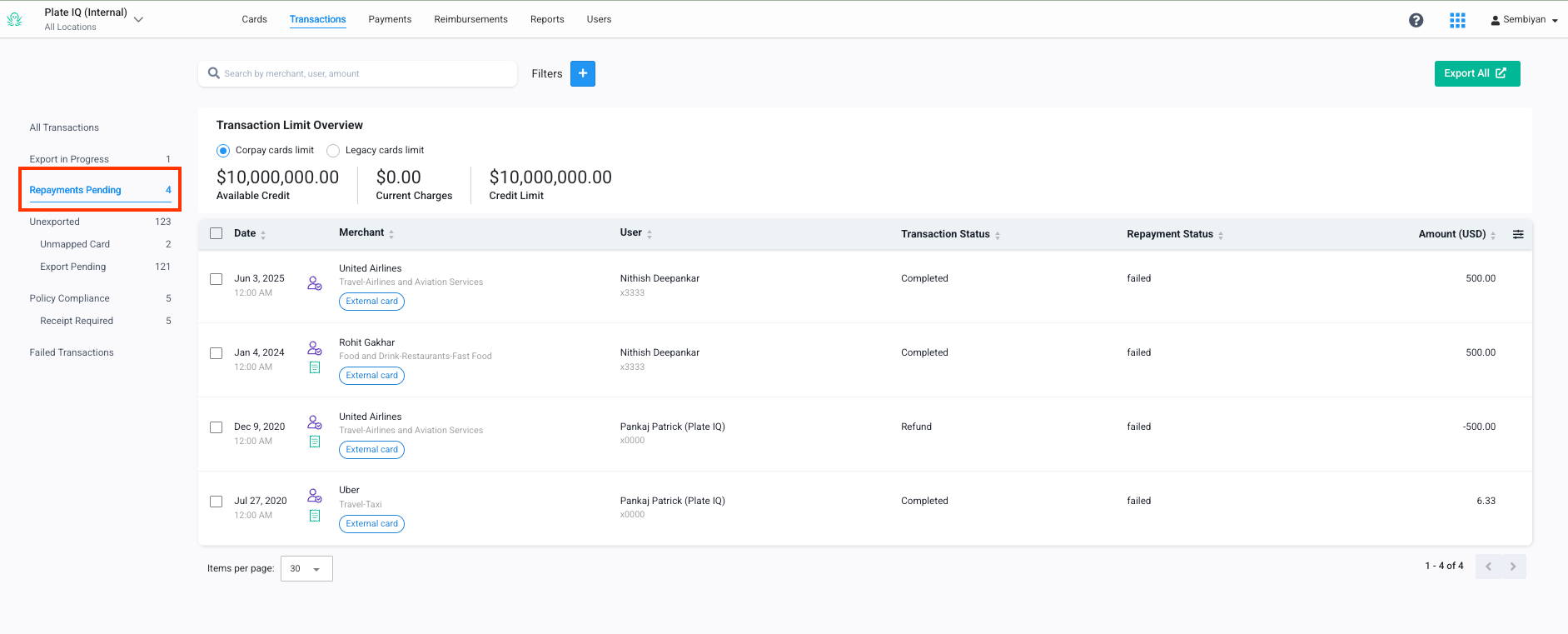
This tab shows card transactions that need to be repaid by the employee.
You may see transactions here if:
You marked a card transaction as personal.
Your approver rejected a card transaction.
Your finance team marked the transaction as requiring repayment.
How to repay a transaction
Go to the Repayments pending tab.
Review the transaction or transactions that need repayment.
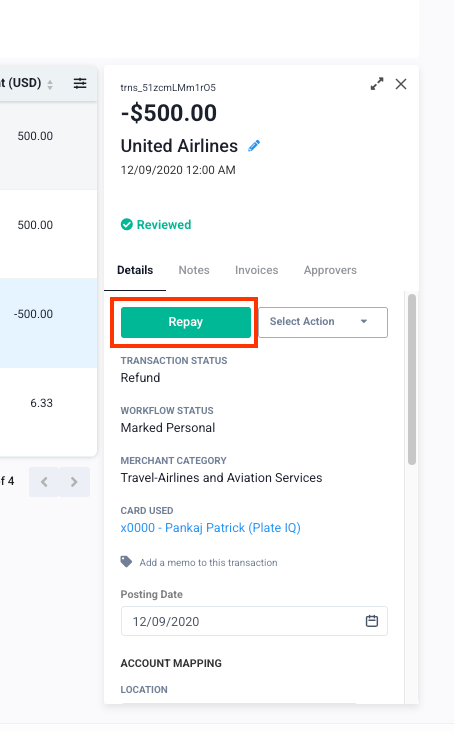
Click Repay.
If you have not already added a repayment bank account, you will be prompted to add one.
Once your repayment bank account is added, return to the Repayments pending tab.
Select the transaction or transactions you want to repay.
Confirm and submit the repayment.
You can repay a single transaction or select multiple eligible transactions and repay them together.
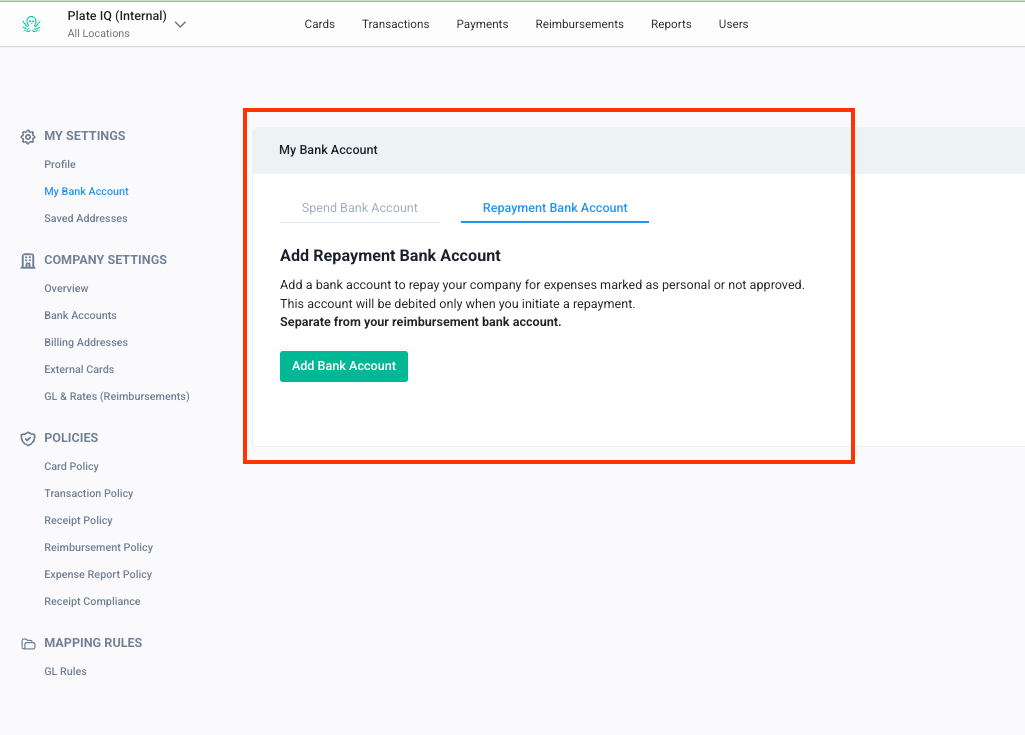
Why do I need to add a separate repayment bank account?
Repayments involve debiting money from your personal bank account and moving it back to your company.
Because this is different from reimbursing you, Ottimate requires you to add a separate bank account specifically for repayments.
Your reimbursement bank account will not be automatically used for repayments.
This ensures that you explicitly authorize the bank account used for repayment debits.
Can I use my reimbursement bank account for repayments?
No. Ottimate does not automatically reuse your reimbursement bank account for repayment debits.
Even if you already have a reimbursement bank account on file, you must add a separate repayment bank account before you can process repayments.
Can I repay multiple transactions at once?
Yes. You can select multiple eligible personal or rejected transactions and repay them together.
The total repayment amount must be within the weekly repayment limit.
Is there a repayment limit?
Yes. Repayments are limited to $150,000 per employee per week.
If the selected transactions exceed this weekly limit, the repayment cannot be processed together. You may need to repay a smaller amount or wait until the next weekly limit period.
What happens after I repay?
Once repayment is submitted, the selected transaction or transactions will move out of the pending repayment workflow once the repayment is processed.
Your finance team can use this workflow to track repayment activity for personal or rejected card transactions.
Common scenarios
Frequently Asked Questions
What is the Repayments pending tab?
The Repayments pending tab shows card transactions that need to be repaid by the employee, such as transactions marked as personal or transactions rejected during review.
Why does the employee need to add a separate bank account?
Repayments debit money from the employee’s personal bank account and move it back to the company. Since this is different from reimbursing the employee, Ottimate requires a separate repayment bank account.
Does Ottimate use the reimbursement bank account for repayments?
No. Ottimate does not automatically use the reimbursement bank account for repayment debits. Employees must add a separate personal bank account for repayments.
Can employees repay multiple transactions at once?
Yes. Employees can bulk select multiple personal or rejected transactions and repay them together, as long as the total is within the weekly repayment limit.
What types of transactions are eligible for repayment?
Transactions marked as personal and transactions that are rejected are eligible for repayment.
Who receives the repayment?
The repayment is processed from the employee’s personal bank account back to the company’s bank account.
What if I cannot process a repayment?
Check that you have added a repayment bank account and that the selected transactions do not exceed the weekly repayment limit. If you are still unable to process the repayment, contact your company’s finance team or Ottimate Support.
Was this article helpful?
That’s Great!
Thank you for your feedback
Sorry! We couldn't be helpful
Thank you for your feedback
Feedback sent
We appreciate your effort and will try to fix the article