User List

Modified on Thu, Dec 4 at 10:30 AM

This report offers a detailed list of all users in your Ottimate account.
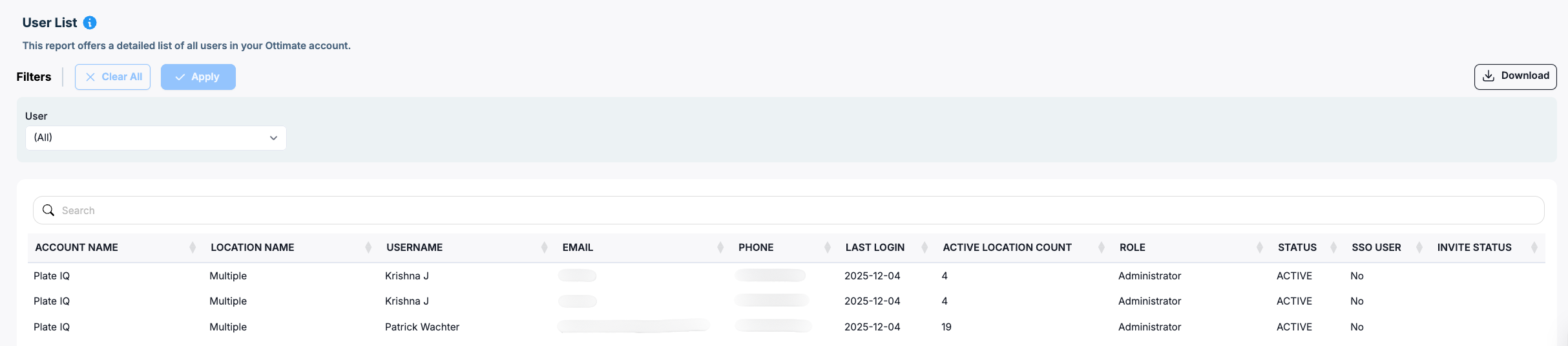
Filters

Filter

Description

User

Filter the report by a specific user or view all users


Field Description

Field

Description

Account Name

Name of the Ottimate account the user belongs to

Location Name

Location(s) the user has access to within the account

Username

Name of the user as configured in Ottimate

Email

Email ID of the user

Phone

Phone number configured on the user profile

Last Login

Date when the user last logged in to Ottimate

Active Location Count

Number of active locations the user currently has access to

Role

User’s role in the system (for example, Administrator, Approver, AP Clerk)

Status

Indicates whether the user is ACTIVE or INACTIVE in Ottimate

SSO User

Indicates if the user authenticates via Single Sign-On (Yes/No)

Invite Status

Indicates whether a user has a pending invite or has already accepted the invitation


Access Model

Category: Admin Exports

Available to users as a standard report across all plans


Was this article helpful?

That’s Great!

Thank you for your feedback

Sorry! We couldn't be helpful

Thank you for your feedback

Let us know how can we improve this article!

Select at least one of the reasons
CAPTCHA verification is required.

Feedback sent

We appreciate your effort and will try to fix the article