Overview
Protected Invoice States help prevent unintended changes to invoices after they have moved further along in the accounting lifecycle.
With this feature enabled, invoices become progressively more protected once they are:
Approved
Exported to ERP
This helps reduce:
accidental accounting changes
ERP mismatches
reconciliation issues
audit confusion
Approved and Exported invoices become protected. Users without the appropriate permissions may be restricted from making accounting-impacting changes.
The goal is to ensure that invoices marked as “Approved” or “Exported” more accurately represent finalized accounting records.
Availability
This feature is currently available as a Beta and is enabled on a per-account basis.
Customers can control access through:
Role-level permissions
User-level protected invoice access
If you are interested in enabling this feature for your account, please reach out to your Customer Success Manager or Support team.
How It Works
Protected Invoice Permissions
Two new permissions are available:
Edit Approved Invoices
Edit Exported Invoices
These permissions work alongside existing permissions such as:
Edit Invoice Details
Edit Invoice Items
Users must have both the underlying edit permission and the appropriate protected-state permission to modify approved or exported invoices.
Managing Access
Customers can grant access in two ways:
Option 1: Role-Based Access
Navigate to:
Settings → Manage Roles
Enable:
Edit Approved Invoices
Edit Exported Invoices
All users assigned to that role will receive access.
Option 2: User-Based Access
Administrators can grant protected invoice access to specific users using the Manage Protected Invoice Access command.
This option is useful when only selected users should be able to modify protected invoices.
Important:
If role permissions are enabled, all users in that role inherit access.
User-level access should be used when access needs to be limited to specific individuals.
Actions Restricted on Protected Invoices
Depending on permissions, users may be restricted from actions such as:
Editing invoice details
Editing invoice items
Editing account splits
Archiving invoices
Deleting invoices
Flagging invoices
Converting invoices to statements
Other accounting-impacting modifications
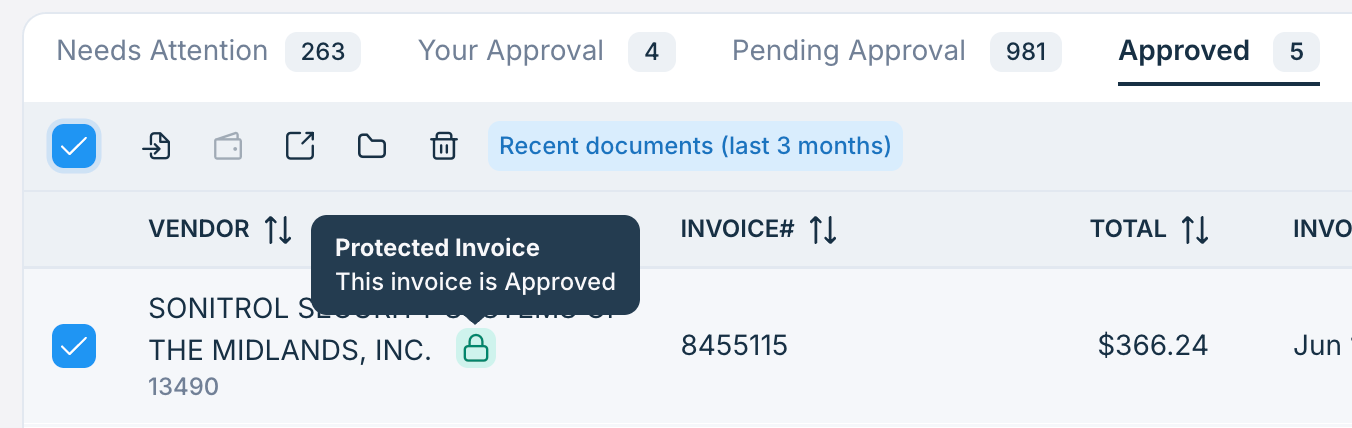
Protected invoices display a lock icon to indicate restricted access.
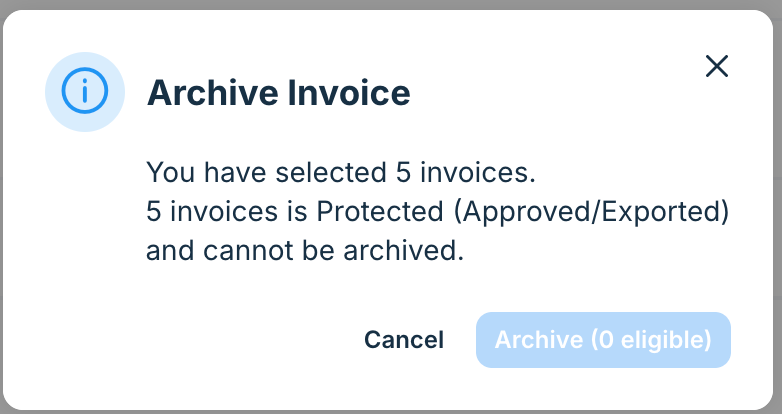
If user tries to archive / delete any protected invoice, we display following warning message:
Actions That Continue to Work
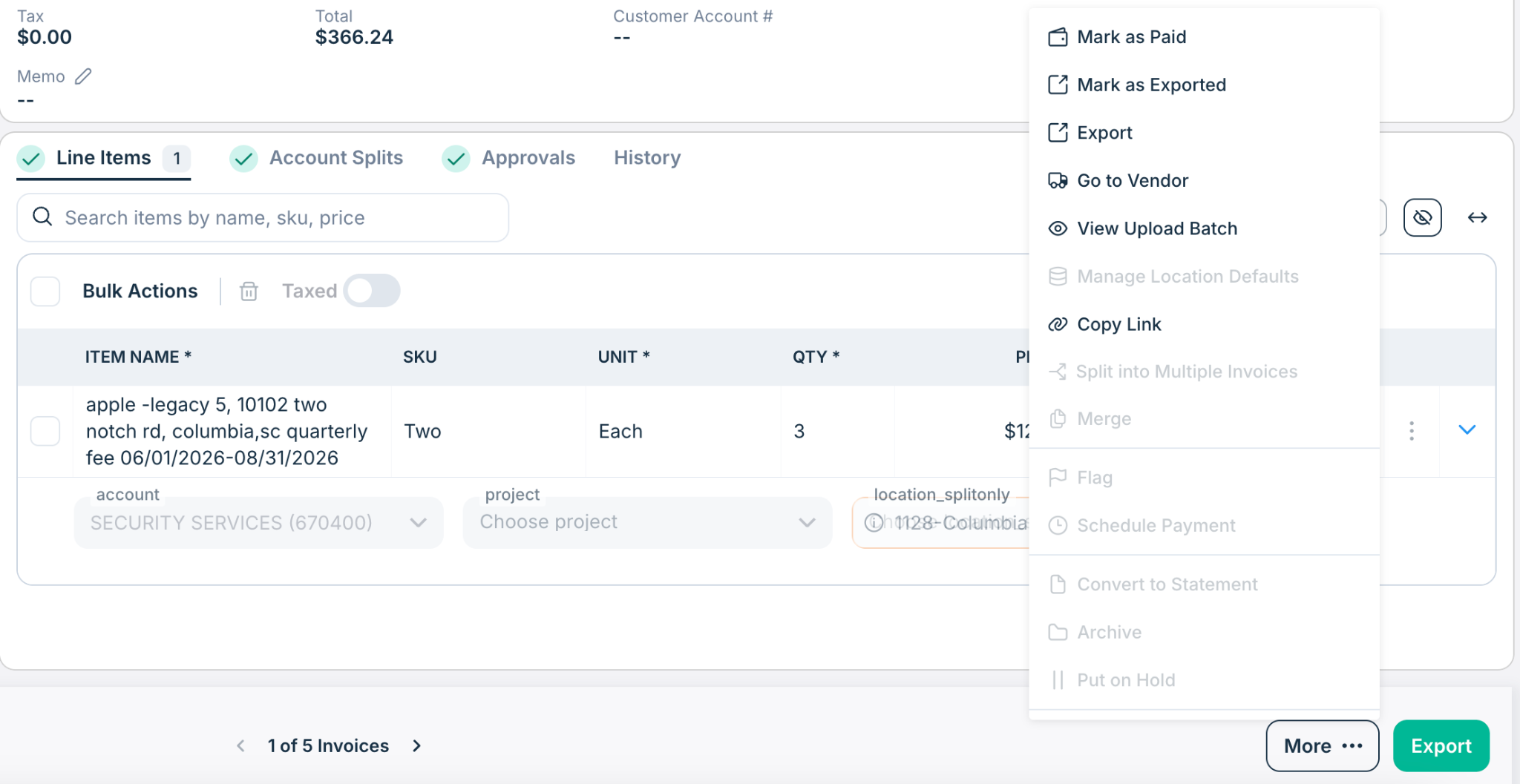
Protected Invoice States do not block normal workflow progression.
These actions continue to rely on their existing permissions:
Export
Mark as Exported
Mark as Not Exported
Mark as Paid
Mark as Unpaid
FAQs
Q: Can approved or exported invoices still be edited?
Yes.
Users with the appropriate permissions can continue to edit protected invoices.
Users without those permissions will see restricted actions and protected invoice indicators.
Q: What does the lock icon mean?
The lock icon indicates that an invoice is protected because it has been Approved or Exported.
Some actions may be restricted depending on the user's permissions.
Q: Can I control access by role?
Yes.
Administrators can enable:
Edit Approved Invoices
Edit Exported Invoices
for specific roles.
Q: Can I grant access to only certain users?
Yes.
Protected invoice access can be granted to specific users without granting it to an entire role.
Q: Does this feature block exporting invoices?
No.
Export permissions continue to work as they do today.
Protected Invoice States are designed to restrict accounting modifications, not workflow continuation.
Q: Does this feature block marking invoices as paid?
No.
Mark Paid and Mark Unpaid continue to rely on existing payment permissions.
Q: Does this feature block flagging invoices?
Yes.
Users without the appropriate protected-state permissions cannot flag protected invoices because flagging changes invoice state and workflow.
Q: Is this feature mandatory?
No.
The feature is currently available as a Beta and can be enabled or disabled at the account level.
Q: Will invoice history still show changes?
Yes.
Changes made to protected invoices are logged in invoice history for audit visibility.
Q: Does this feature affect unapproved invoices?
No.
Unapproved invoices continue to follow existing editing behavior and permissions.
Additional Information
For further assistance, contact Ottimate Support by emailing Support@ottimate.com or clicking here.
Was this article helpful?
That’s Great!
Thank you for your feedback
Sorry! We couldn't be helpful
Thank you for your feedback
Feedback sent
We appreciate your effort and will try to fix the article