When Ottimate processes a vendor statement, each line on the statement is matched against the invoices in your account. Lines that match are reconciled; lines that do not are your missing invoices — charges the vendor says exist that Ottimate has never seen. You can request copies from the vendor without leaving the statement.
Sending the email
Open the statement and review its lines. Unmatched lines are your missing invoices.
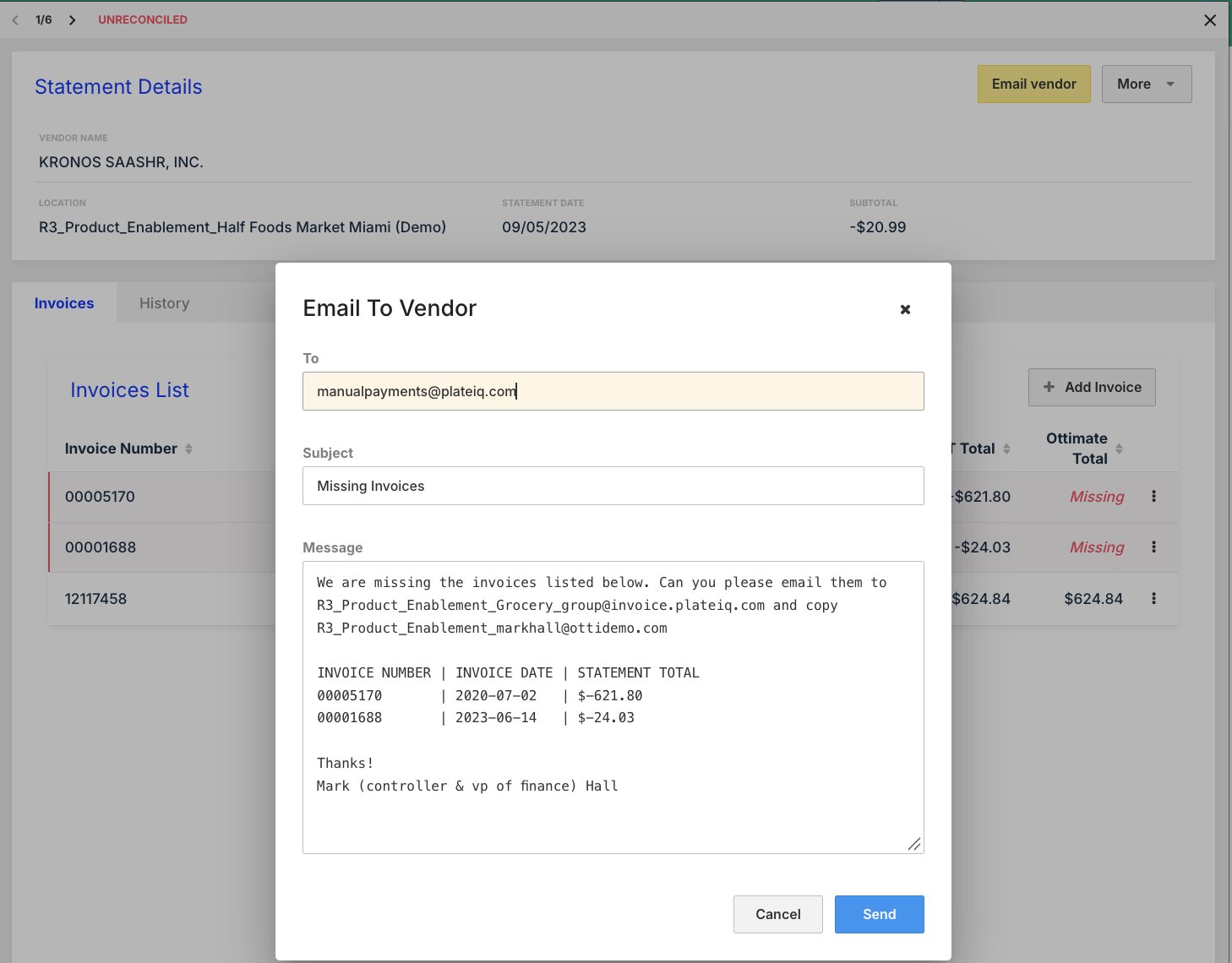
Click Email Vendor.
Fill in the recipient. The To address is required; Ottimate remembers the vendor contact email you used for this vendor and location, so after the first send it is pre-filled.
The Subject defaults to "Missing Invoices" and the Message is pre-built with a table of the missing invoice numbers, dates, and amounts from the statement. Edit either before sending.
Send. The send is recorded in the statement’s history.
After the vendor responds
When the vendor sends the missing invoices, get them into Ottimate the same way as any invoice (your invoice email address is the fastest). As they are processed, they match against the open statement lines. Once everything on the statement is accounted for, use Mark as Reconciled on the statement.
Was this article helpful?
That’s Great!
Thank you for your feedback
Sorry! We couldn't be helpful
Thank you for your feedback
Feedback sent
We appreciate your effort and will try to fix the article