This report provides a detailed audit trail of every user-made change to an invoice in your organization, including who edited the invoice, when the edit was made, which field was changed, and the before and after values for that field.
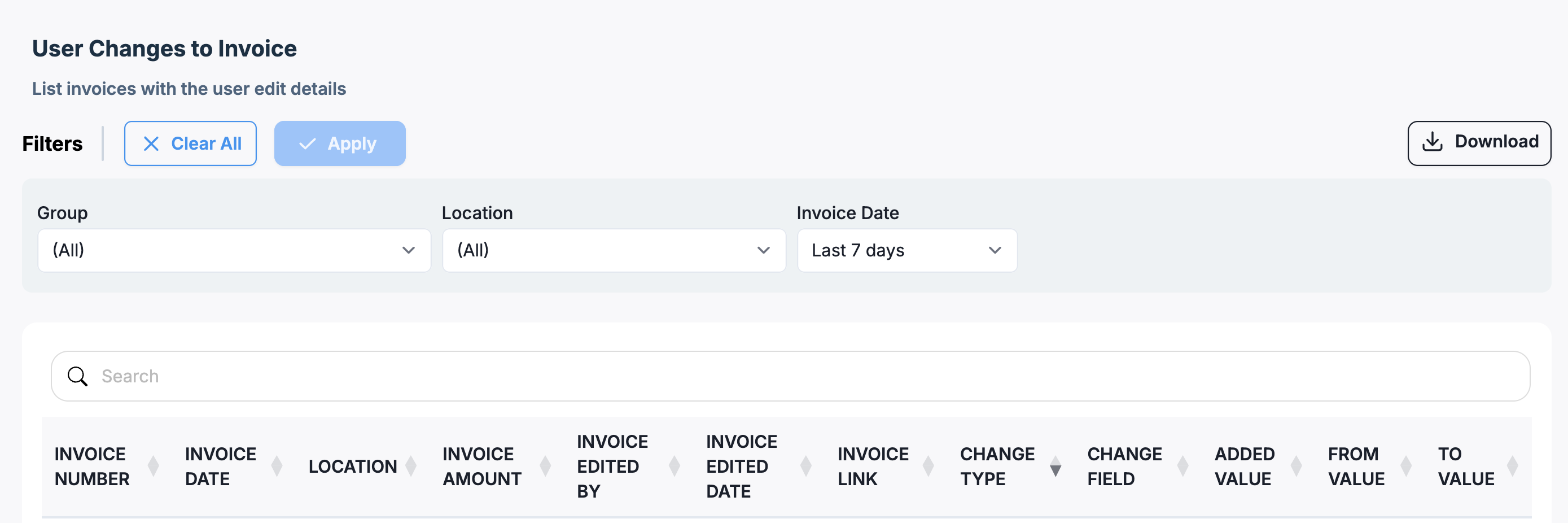 Filters
Filter | Description |
| Group | Filter to view edits only for invoices belonging to a specific location group. Defaults to All. |
| Location | Filter to view edits only for invoices belonging to one or more specific locations. Defaults to All. |
| Invoice Date | Filter by the date on the invoice itself. Defaults to the last 7 days. Use the dropdown to select a preset range or a custom range. |
You can also use the search bar to quickly locate a specific invoice number, user, or field.
Report Columns
Note: Each row in the report represents a single field-level change, so a single invoice edit that modifies multiple fields will appear as multiple rows — one per field.
Access Model
Category: Admin Exports
This is an advanced report. Contact your Account Manager or support@ottimate.com if you do not currently have access to Advanced Reports and would like to add them on.
Was this article helpful?
That’s Great!
Thank you for your feedback
Sorry! We couldn't be helpful
Thank you for your feedback
Feedback sent
We appreciate your effort and will try to fix the article